
Transaction Detail
The transaction detail page is the single source of truth for one payment. Reach it by clicking any row on the Transactions list, or by visiting /merchant/transactions/<external_id> directly. This page describes every section you'll see.
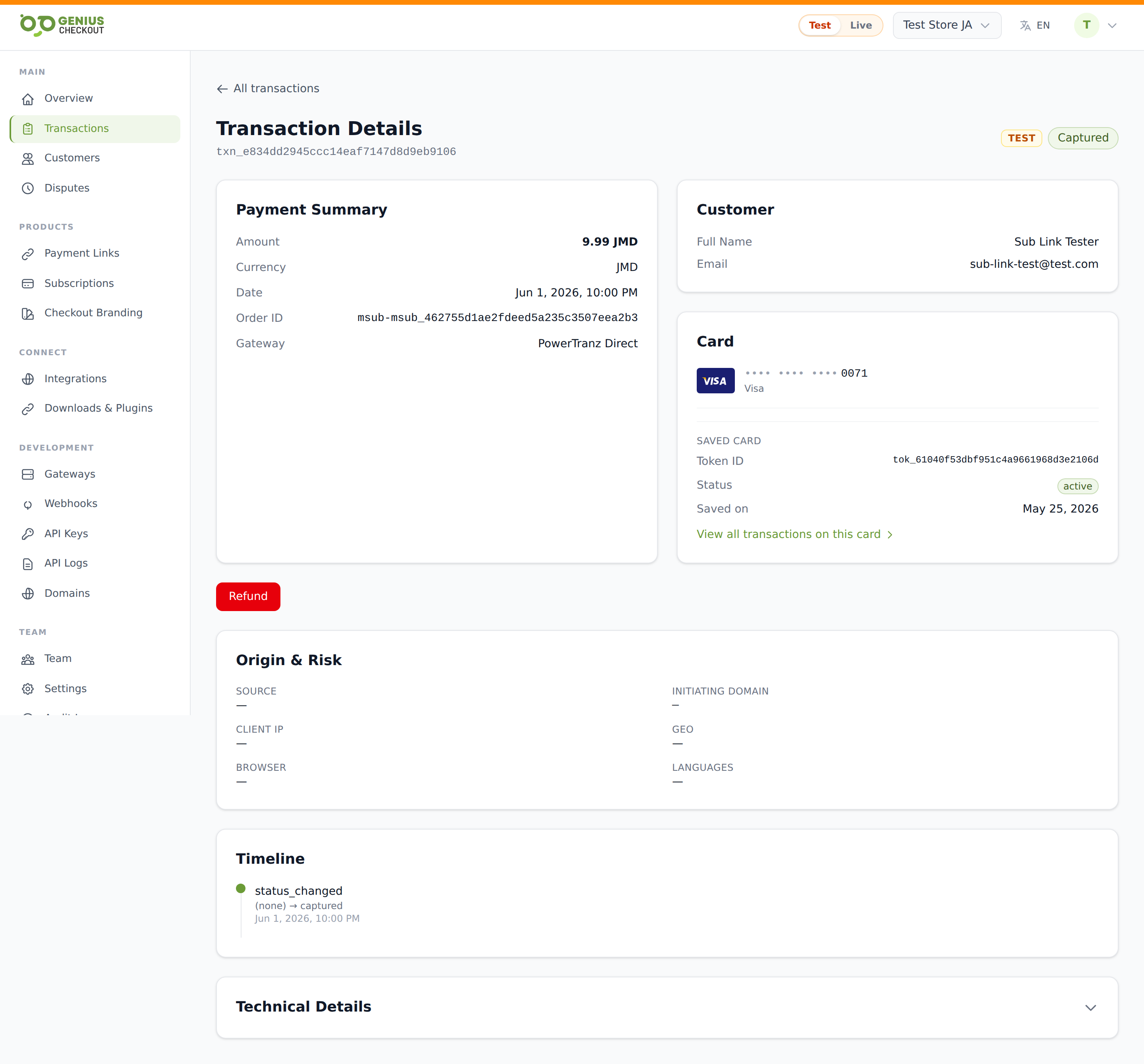
Header
The top of the page shows:
- Heading — "Transaction" plus the external id (monospaced, copy-able).
- Mode pill — TEST or LIVE, matching the row in the list.
- Status pill — current status (Captured, Authorized, Refunded, Declined, etc.) coloured the same way as the list.
A back link to All transactions sits above the header.
Payment Summary
The left card on the summary row:
- Amount — formatted with locale + ISO code (e.g.
$10.00 USD). - Currency — ISO code.
- Date — created-at timestamp.
- Order ID — if the integration sent one.
- Gateway — friendly name (e.g. PowerTranz, MPGS).
- Payment Link — link title, if the transaction came from one.
- Checkout Session — session id, when applicable.
Customer
The right column shows everything we captured about the buyer: name, email, phone, address, city/state/postal, country. If the buyer didn't authenticate or attach to a customer record, you'll see Guest checkout instead.
Card
Renders when the transaction used a card. Includes:
- Brand icon (Visa, Mastercard, Amex, Discover, JCB, Diners, UnionPay, Maestro, Dankort) or a generic chip otherwise.
- Masked PAN with the last 4.
- Expiry (MM/YY).
- Card funding type (credit, debit, prepaid), issuer name, and country if BIN-resolved.
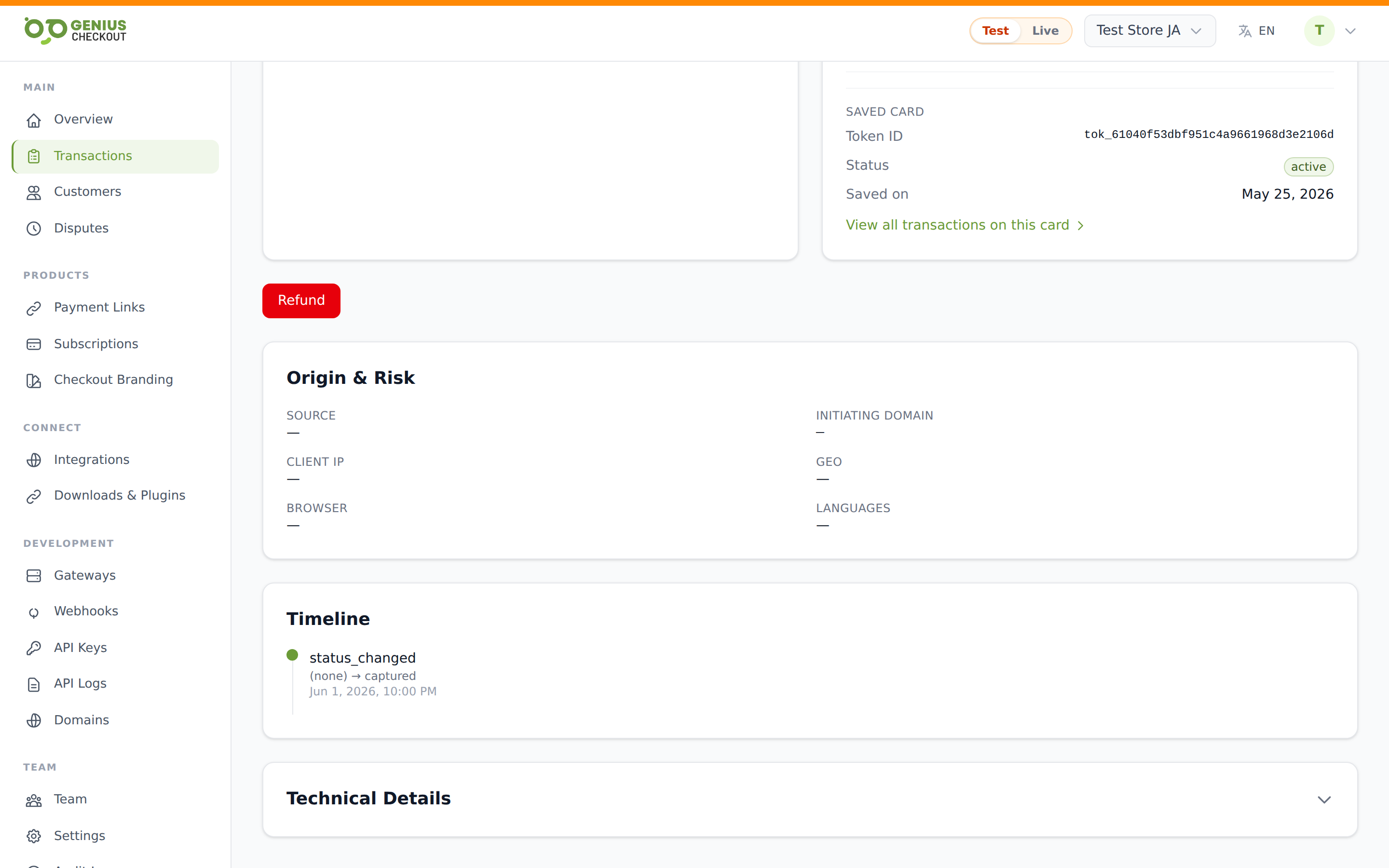
If the buyer saved the card, a Saved card sub-panel appears with the token's external id, current status, the saved-on date, and a View token transactions link that drops you back to the Transactions list filtered to that token. See Saved Payment Methods for more on tokens.
Actions
Action buttons render conditionally based on status:
- Capture payment — appears when status is
authorized. Settles the held auth. See Captures & Voids. - Void — appears when status is
authorized. Releases the hold without settling. - Refund — appears when status is
capturedorpartially_refunded. Opens the refund modal. See Issuing Refunds.
If your role lacks the relevant permission (Team Members & Roles), the action buttons don't appear at all.
Additional details
If the transaction came through a payment link with custom fields, the buyer's responses render in a two-column grid here. Fields the merchant flagged as PII show as Click to reveal placeholders — clicking writes an audit-log row before returning the real value.
Origin & risk signals
Captured at checkout time for fraud investigation:
- Source — channel slug (Payment Link, API, integration name).
- Initiating domain — the host the request came from.
- Client IP — buyer's IP plus geo if resolved.
- Geo — city and country derived from IP.
- Browser — user-agent string.
- Languages — Accept-Language header, decoded to readable names ("English (US), Spanish").
Expand Raw risk signals to see the full underlying JSON when our orchestrator records one.
Refunds
Lists every refund attached to this transaction, with the refund id, reason, amount, and refund status (completed, pending). See Issuing Refunds.
Timeline
A vertical list of every status transition, oldest at the top: event type, from-status → to-status, and timestamp. Useful for understanding when a transaction moved between states (e.g. when 3-D Secure completed, when capture happened).
Technical Details
Collapsed by default. Expand for:
- Gateway transaction id
- Gateway config id and credential version id
- Order Identifier, Transaction Identifier, ISO Response Code, Response Message
- RRN (Retrieval Reference Number) and Authorization Code from the acquirer
- Outbox events — the webhook events emitted for this transaction and their delivery status (
processed,pending, etc.). Cross-reference against Webhook Deliveries for retry history. - Raw gateway response — the full redacted JSON, useful when contacting support.
TIP
The transaction id at the top of the page (and the gateway transaction id under Technical Details) are the two most useful identifiers when emailing support. Include both.