
Test vs live credentials
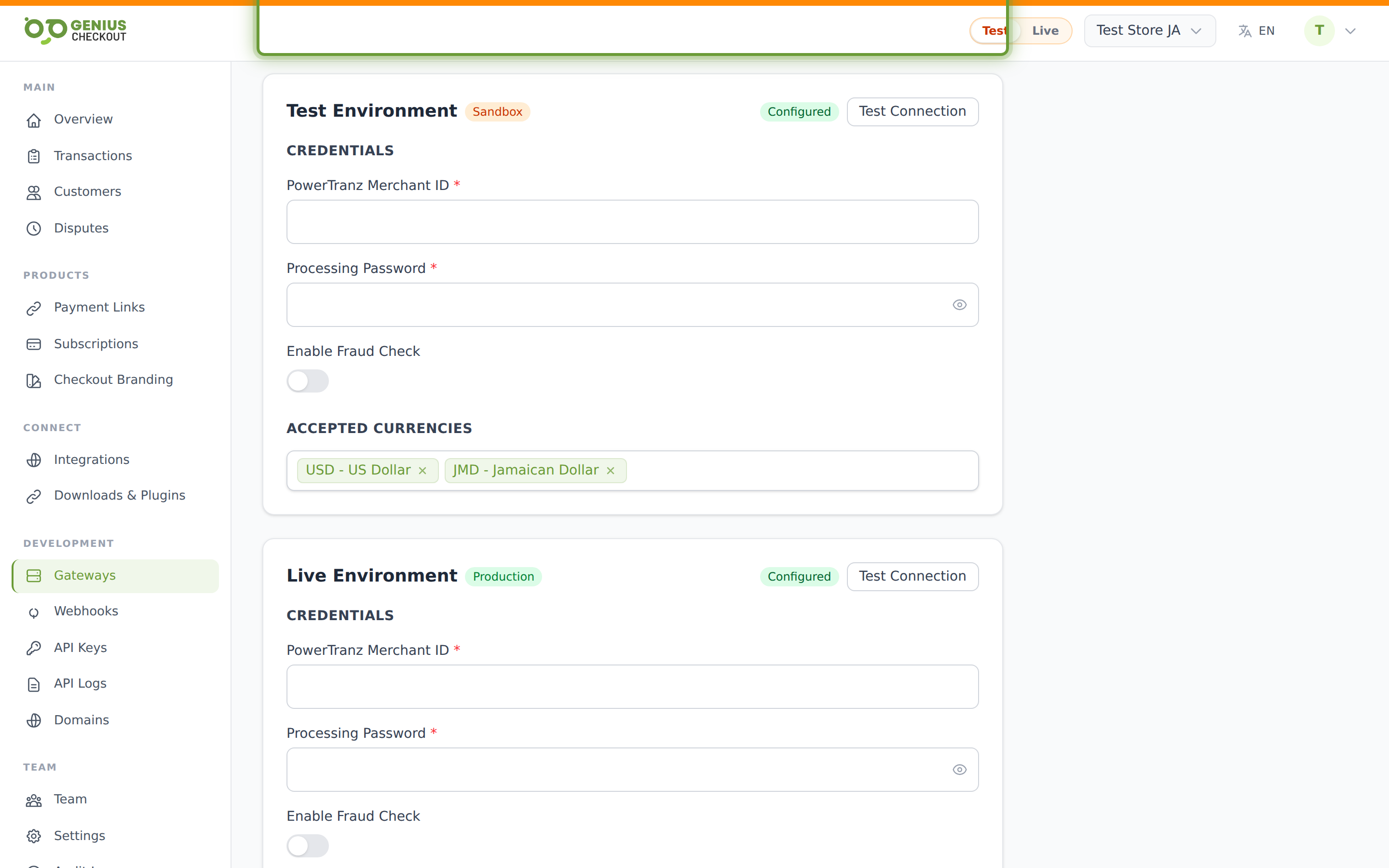
Every gateway stores two independent sets of credentials — one for test mode (sandbox) and one for live mode (real money). This page explains how the two are kept separate and how to wire each one correctly.
How each gateway maps modes
| Gateway | Test endpoint | Live endpoint |
|---|---|---|
| Powertranz Direct / HPP | https://staging.ptranz.com | https://gateway.ptranz.com |
| MPGS Direct / HPP | The host assigned by the acquirer. Sagicor test profiles use the Sagicor host; use mtf only when the bank issues an MTF profile. | Region preset (ap / eu / na / sagicor) or your custom live Gateway URL |
| PayPal | PayPal sandbox API base | PayPal production API base |
When you save a gateway, the system creates two GatewayCredentialVersion rows — one tagged mode: test and one tagged mode: live. Each row holds its own encrypted credentials. Changing one never affects the other.
Enabled modes
Each gateway has an Enabled modes array (at least one of test, live). This independently controls whether each mode can route traffic:
- A gateway with
enabled_modes: ['test']can never process a live transaction even if live credentials are filled in. - A gateway with
enabled_modes: ['live']won't show up to sandbox testers — useful once you're sure the configuration works and want to keep developers off your live keys. - Most production setups end up with both enabled.
Portal-wide mode pill
The Test / Live pill in the top bar of the portal scopes everything you look at — transactions, payment links, subscriptions — to that mode. It also pins newly-created payment links to whichever mode you're viewing.
The two mode systems interact like this:
| Portal pill | Link mode | Gateway enabled modes | What happens |
|---|---|---|---|
| Test | test | gateway has test enabled | Routes to test credentials |
| Test | test | gateway has only live enabled | Link can't process — pick another gateway or enable test on this one |
| Live | live | gateway has live enabled | Routes to live credentials |
| Live | test (legacy) | gateway has test enabled | Test link still works — but you won't see it in the list until you flip the pill |
Per-mode currencies
Each gateway has separate test currencies and live currencies lists. A common production setup looks like:
| Setting | Test | Live |
|---|---|---|
| Enabled modes | yes | yes |
| Currencies | USD (just one — for sandbox smoke testing) | USD, JMD, TTD, BBD (the real list) |
This way a developer can confirm a sandbox payment works in USD without you having to maintain a full currency matrix on the test side.
Common credential mix-ups
Don't paste live credentials into the test slot
Test and live profiles are separate. Mixing a live Merchant ID or password with a test endpoint normally produces authentication, merchant-routing, or operation errors.
Mistakes we see often
| Mistake | Symptom | Fix |
|---|---|---|
| Live Powertranz password in the test slot | Test charges return "Authentication failed" against staging.ptranz.com | Re-paste the staging password from your processor portal |
| MPGS test merchant ID + live API password | 401 on the connection test | Both fields must come from the same MPGS environment |
MPGS region_preset = sagicor but credentials are MTF | Connection fails or transactions are not found on the expected profile | Use the gateway host supplied with that Merchant ID |
| HPP PageSet/PageName not configured per-mode | Test charges cannot open the Powertranz hosted page | Fill the HPP values separately for Test and Live |
enabled_modes: ['live'] on a brand-new gateway | Test mode users get "No gateway available" errors | Add test to enabled modes or switch portal to Live |
Test the connection
After saving, hit Test connection on each mode card. The system attempts a real handshake with the gateway and surfaces the actual response:
- Green checkmark — credentials are valid. You're ready to charge a sandbox card.
- HTTP 401 — wrong API password or processing password.
- HTTP 404 — wrong merchant ID or gateway URL (often a region-preset mismatch).
- "Could not reach gateway" — outbound network or DNS issue from the Genius Checkout host.
Always test both modes
After saving, run the connection test once for test and once for live. A passing test mode says nothing about whether live works — the credentials and URLs are different secrets entirely.