
Adding a gateway
A gateway connects Genius Checkout to a payment processor or wallet. You can't take a payment until at least one gateway is configured and active.
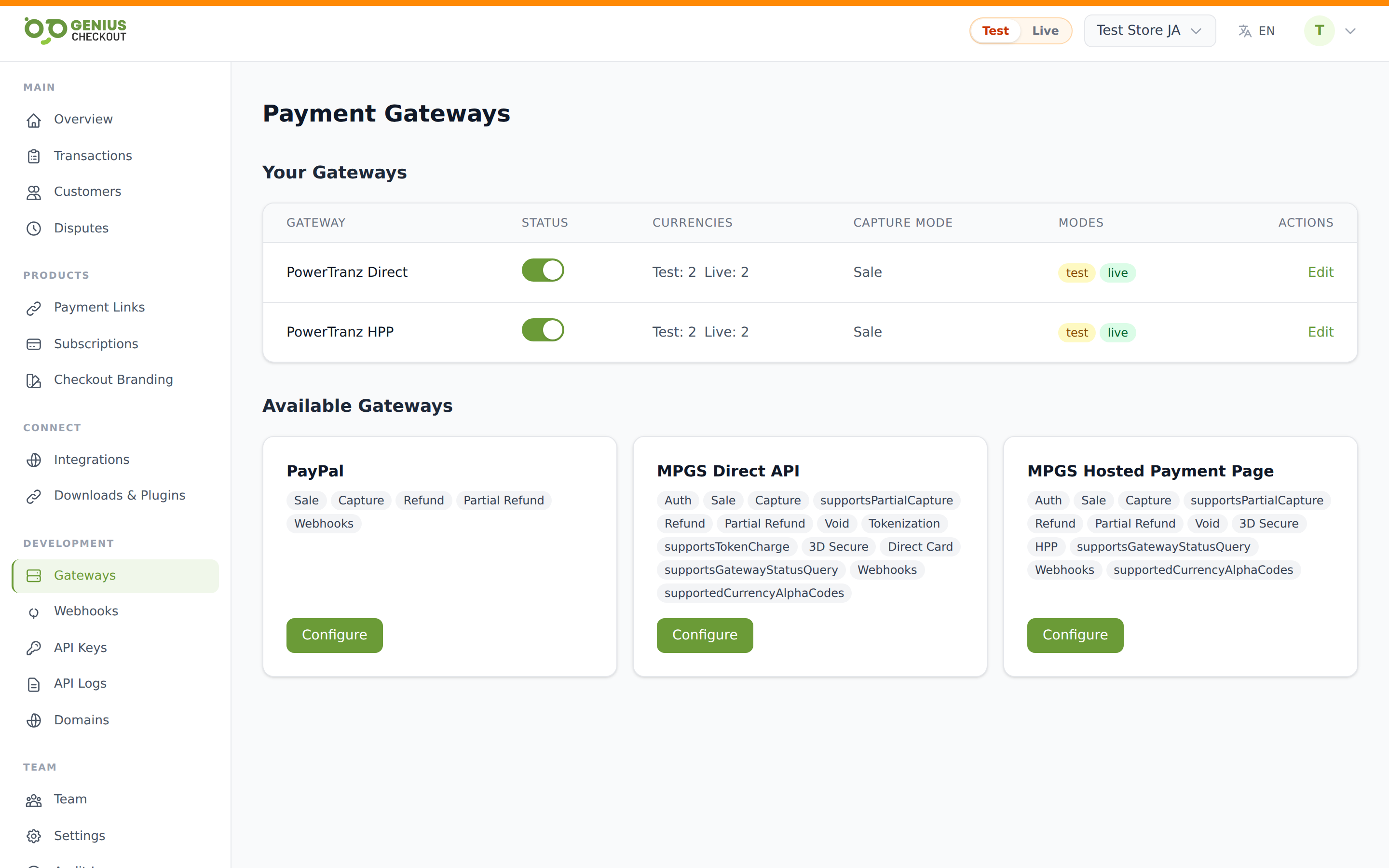
The Gateways page
Open Gateways from the sidebar. You'll see two sections:
- Your Gateways — gateways already configured. Each row shows a Status toggle, test/live currency counts, capture mode, enabled modes, and an Edit link.
- Available Gateways — tiles for every processor your plan supports but you haven't configured yet. Each tile shows capability chips (Auth, Sale, Refund, Tokenization, 3D Secure, HPP, etc.) and a Configure button.
Plan limits
Your plan caps how many gateways you can have configured per merchant account. If you hit the cap, the configure flow returns an error pointing to the upgrade page.
Supported processors
| Gateway | Use it for | Card capture |
|---|---|---|
| Powertranz Direct | First Atlantic Commerce / Powertranz API charging. Direct card entry on your checkout page. | Direct |
| Powertranz Hosted Payment Page | Same processor, but uses Powertranz's hosted page so the card never touches your domain. | Hosted |
| MPGS Direct API | Mastercard Payment Gateway Services (Sagicor, RBC, FAC, etc.) — direct API. | Direct |
| MPGS Hosted Payment Page | MPGS via the hosted checkout (less PCI scope; lighter branding control). | Hosted |
| Lynk | Jamaican mobile-wallet payments approved in the buyer's Lynk app. | Wallet approval |
| Wompi | Colombian payments, with the methods enabled for the merchant account. | Hosted Web Checkout |
| PayPal | International PayPal Checkout payments. | PayPal redirect |
Provider-specific setup guides
Every gateway currently available in Genius Checkout is covered below. Direct and Hosted Payment Page variants share a provider guide because their common credentials and provider onboarding are closely related.
| Gateway entry in Genius Checkout | Setup guide |
|---|---|
| Powertranz Direct | Powertranz setup |
| Powertranz Hosted Payment Page | Powertranz setup |
| MPGS Direct API | MPGS setup |
| MPGS Hosted Payment Page | MPGS setup |
| Lynk | Lynk setup |
| Wompi | Wompi setup |
| PayPal | PayPal setup |
Direct versus Hosted Payment Page
Direct means the buyer enters card details in the Genius Checkout payment form. It provides a consistent checkout and can support tokenization, saved cards, and subscriptions when the gateway has those capabilities, but normally creates greater PCI scope.
Hosted Payment Page (HPP) means the buyer continues to a page hosted by the gateway. The gateway collects card details, normally reducing PCI scope, but some capabilities such as saved cards or subscriptions may not be available through that integration.
Direct and HPP are separate gateway configurations. Choose the model your bank has provisioned; credentials for a merchant profile do not automatically enable both.
Credentials per gateway
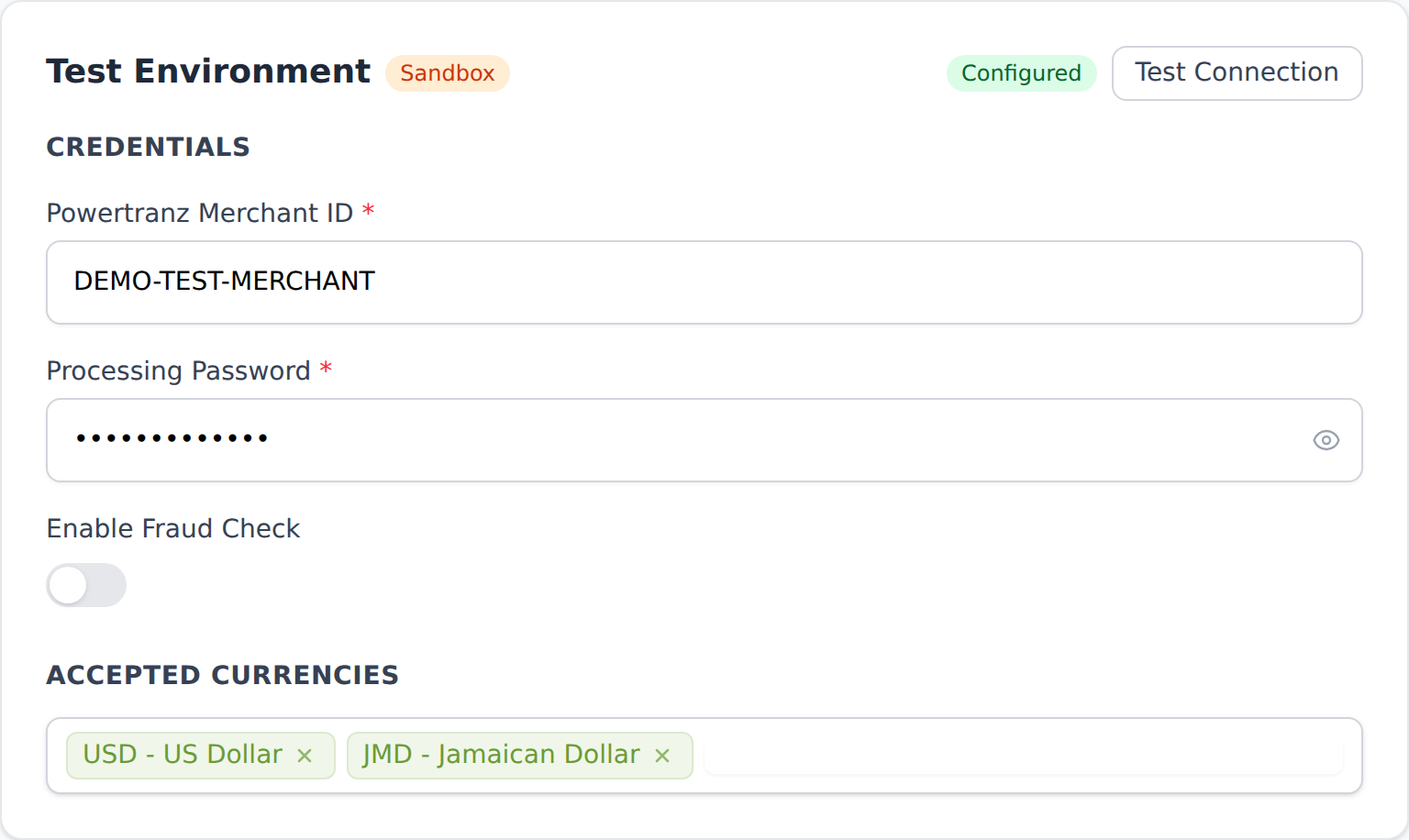
Powertranz Direct and HPP
- Powertranz Merchant ID — issued by FAC / Powertranz.
- Processing Password — the secret your processor gave you.
- Enable Fraud Check — optional toggle.
HPP-only: PageSet, PageName (per mode — different values for test vs live), and Portal (firstatlantic or powertranz).
See the complete Powertranz setup guide for the source of every field, Hosted Payment Page creation, portal selection, and go-live testing.
MPGS Direct and HPP
- Merchant ID — issued by your acquirer (Sagicor, RBC, FAC). Used in API auth as
merchant.{merchantId}. - API Password — from your MPGS portal under Admin → Integration Settings → Password 1.
- API Version — defaults to
100. Only change if your bank explicitly asks.
Connection settings (per mode):
- Region preset —
ap,eu,na,mtf,sagicor, orcustom. Auto-derives the gateway URL. - Gateway URL — full MPGS endpoint. Required when region preset =
custom; auto-populated otherwise. - Webhook notification secret — the shared secret your bank set for webhook notifications.
Behaviour settings:
- Payment action — Authorize & Capture (one-step PURCHASE/PAY) or Authorize Only (capture later). Use Authorize Only when your bank has not enabled PURCHASE/PAY on the merchant profile.
- Enable 3D Secure and Require 3DS — toggles for fraud-shift protection.
- Order ID prefix — short prefix on every order sent to MPGS (default
GC).
See the complete MPGS setup guide for bank onboarding data, API-password creation, Direct versus Hosted Checkout, and field-by-field configuration.
Lynk
- Lynk Client ID and Lynk Client Secret — separate OAuth credentials issued by Lynk for Test and Production.
- Webhook Shared Secret — the shared secret registered with Lynk for signed notifications.
- Payment timeout — how long to wait for the buyer to approve the JMD request in the Lynk app.
See the complete Lynk setup guide for LynkBiz onboarding, webhook registration, test identities, buyer approval, recurring requests, and manual refunds.
Wompi
- Public key and Private key — separate Test or Production integration keys from Wompi.
- Integrity secret — signs the hosted checkout request.
- Events secret — verifies Wompi transaction-status notifications.
- Order ID prefix — optional prefix used on Wompi transaction references.
Wompi accepts COP through its hosted Web Checkout. See the complete Wompi setup guide for key locations, event configuration, enabled payment methods, and testing.
PayPal
- Client ID and Client Secret — from the matching Sandbox or Live REST application in the PayPal Developer Dashboard.
- Accepted currencies — select only currencies your PayPal Business account can receive.
See the complete PayPal setup guide for REST application creation, sandbox buyer testing, go-live checks, and refunds.
Currencies and modes
For each gateway you specify:
- Enabled modes — at least one of
testandlive. - Test currencies (required) — the 3-letter currency codes the gateway should accept in test mode.
- Live currencies — same, for live mode. Optional but required if you enable live mode.
If a currency isn't enabled here, payment links in that currency won't route to this gateway.
After saving
Both test and live credentials are stored encrypted and versioned — every update creates a new credential version, and the audit log records who changed what (without the secrets themselves). You can roll back if a credential change breaks things.
The Test Connection button is available for Powertranz, MPGS, and Lynk. MPGS creates an empty authenticated session, Powertranz runs a small authorization probe, and Lynk validates its OAuth credentials and required API-key claim. These checks do not complete or capture a customer payment.
Wompi and PayPal should be validated with a complete sandbox checkout and refund because their merchant configuration does not expose the same connection-test action.